


That weekly scramble to find the latest spreadsheet, re-enter customer details, approve invoices by email, and remind staff about missed tasks is not just frustrating – it is expensive. If you want to reduce manual processes in office operations, the goal is not to replace people. It is to remove repetitive work that slows them down, creates errors, and makes growth harder than it should be.
For many small and midsized businesses, manual work builds up gradually. A form gets emailed instead of submitted through a system. One employee becomes the only person who knows how a report is compiled. Staff copy data from one platform to another because the tools do not talk to each other. Each workaround seems manageable on its own. Together, they create delays, inconsistency, and unnecessary risk.
Why manual office work becomes a growth problem
Manual processes usually survive because they are familiar. A team knows how to get the job done, even if the method is clunky. That can feel acceptable when the business is smaller. Once volume increases, though, the same process starts consuming more labor, more management attention, and more follow-up.
The biggest issue is not just lost time. Manual work often affects accuracy, customer experience, and visibility. When information is passed between inboxes, spreadsheets, and paper files, it becomes harder to know what is current, who owns the next step, and whether anything has been missed. In accounting firms, that can mean document collection delays and approval bottlenecks. In agencies, it can mean project intake confusion and inconsistent handoffs. In education settings, it can mean enrollment paperwork, billing, and parent communications taking more staff time than necessary.
There is also a people cost. Skilled employees end up doing administrative work that technology should handle. Instead of focusing on clients, service quality, or strategic tasks, they spend hours chasing signatures, updating lists, and fixing duplicate entries.
Where to reduce manual processes in office workflows first
The best starting point is not the most complicated process. It is the one that happens often, involves clear rules, and creates visible friction. That gives you a faster return and builds confidence for broader improvements.
Repetitive data entry
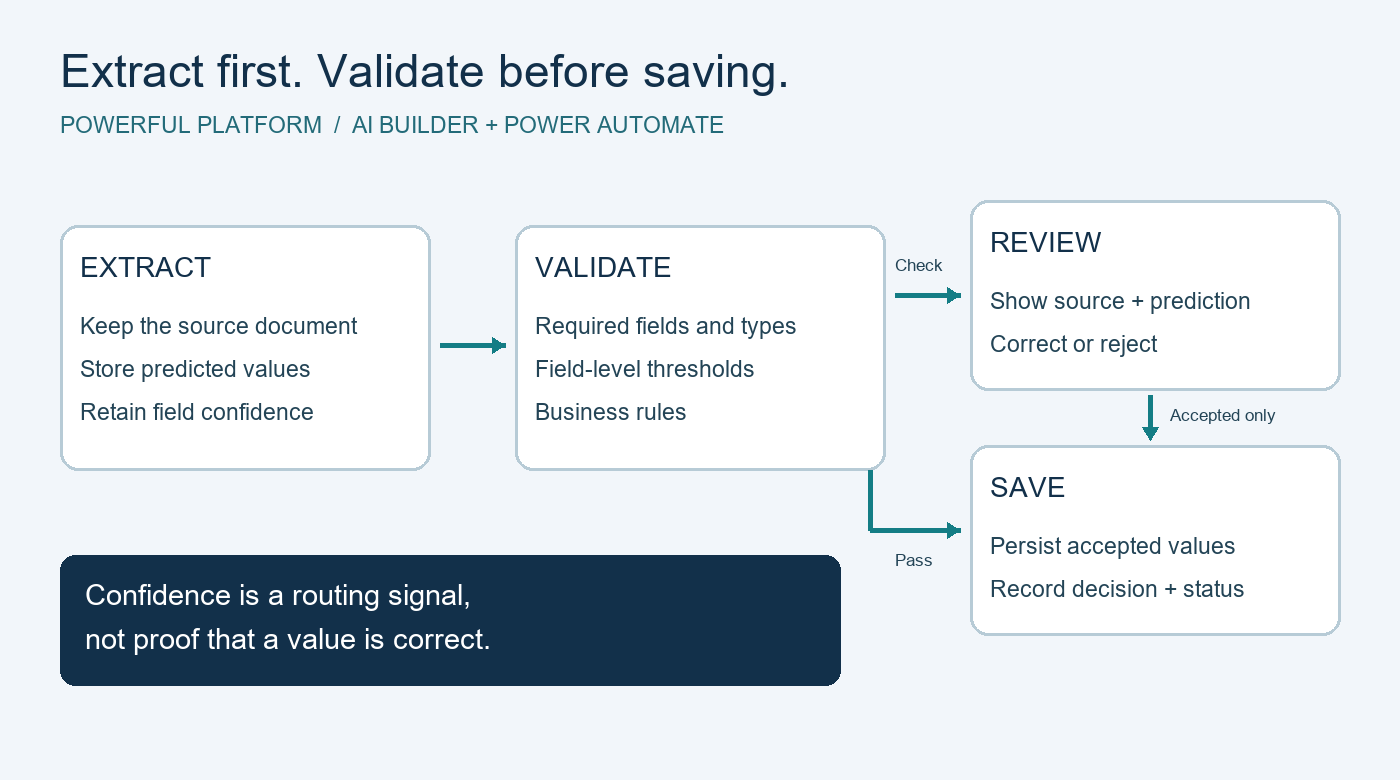
If staff are copying the same information between forms, emails, spreadsheets, CRM systems, accounting tools, or shared documents, that is usually a strong automation candidate. Re-entering data adds labor and introduces mistakes. A simple workflow can capture information once and send it where it needs to go.
Approval chains
Many offices still handle approvals through email threads or verbal check-ins. That works until someone is out, misses the message, or responds without context. Structured approval workflows create a record, define the order of review, and reduce delays.
Document collection and filing
Any process that relies on downloading attachments, renaming files, and moving them into folders is worth reviewing. Document-heavy teams often gain immediate value from automating file routing, naming conventions, notifications, and retention steps.
Recurring internal requests
IT requests, onboarding tasks, purchasing requests, and time-off approvals are common examples. These processes typically follow predictable patterns, which makes them ideal for standardization and automation.
How to reduce manual processes in office settings without creating new problems
Automation is useful when it simplifies work. It becomes a problem when businesses automate a bad process or layer new tools on top of old confusion. A more reliable approach starts with process clarity.
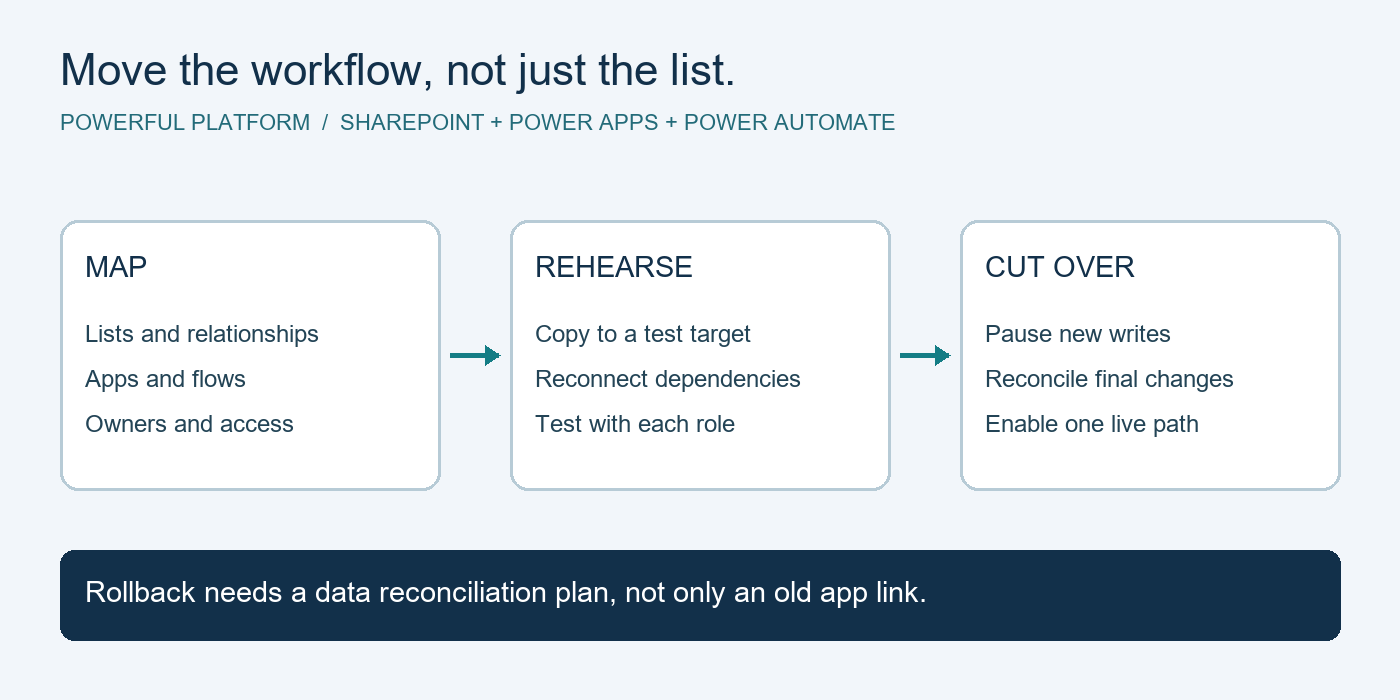
First, map what actually happens today. Not what the policy says should happen, but what employees do in real life. Identify where requests come in, where information is stored, who approves what, and where delays or duplicate effort appear. This step often reveals that the real issue is not effort alone. It is inconsistent process ownership.
Next, decide what good looks like. That might mean reducing turnaround time, cutting manual touches, improving reporting, or creating a more consistent employee experience. Clear goals matter because not every process needs full automation. Some only need a better form, a shared system, or fewer handoffs.
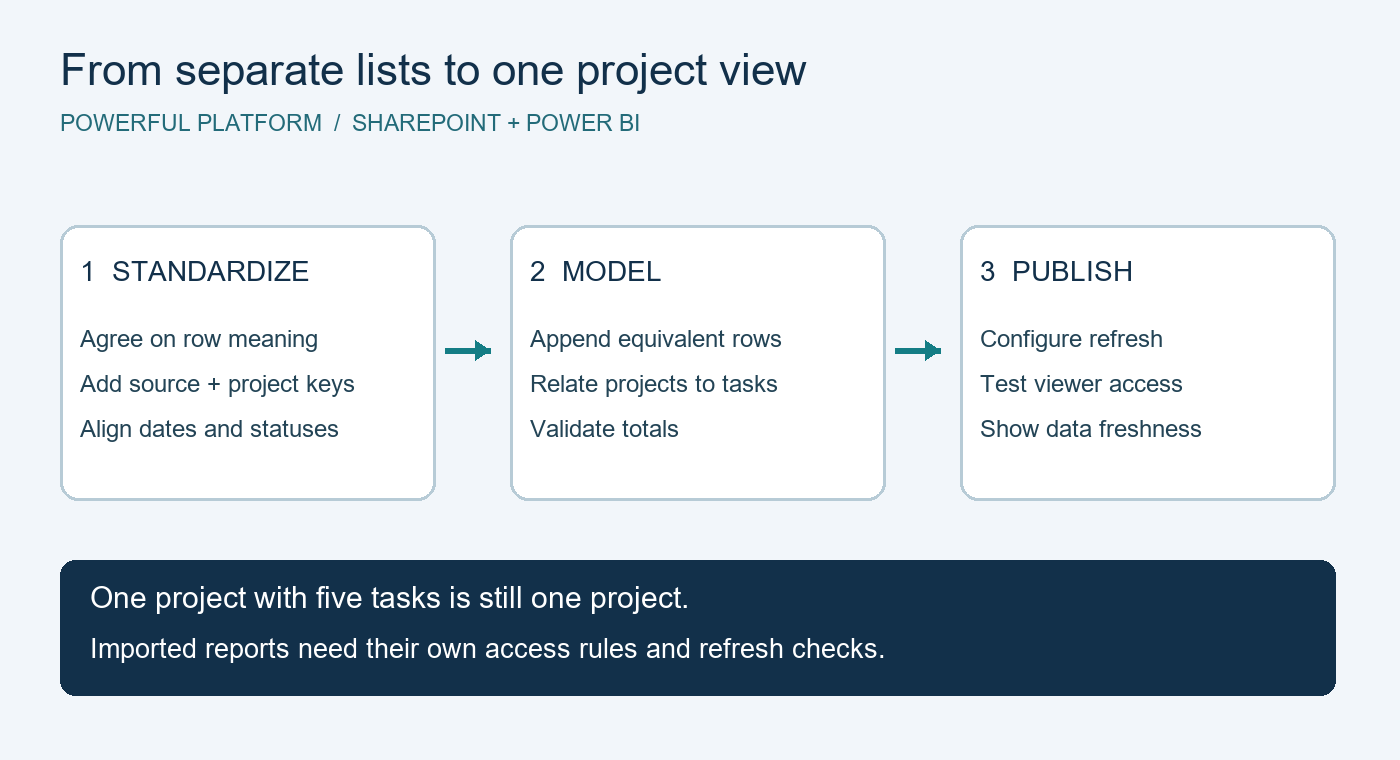
Then, standardize before you automate. If three team members process invoices in three different ways, automation will only reinforce inconsistency. Agree on one workflow first. Define required fields, approval rules, storage locations, and exception handling.
After that, choose tools that fit your environment. For businesses already using Microsoft 365, workflow automation and low-code apps often make sense because they work within the systems employees already know. That can reduce training needs and improve adoption. Still, the right answer depends on your current stack, security requirements, and how complex the process is.
What office automation should actually improve
Good automation should make work easier to manage, not harder to understand. In practical terms, that means a better process usually delivers four improvements.
It reduces rework. Information should be entered once and reused.
It improves visibility. Managers and staff should be able to see status, ownership, and next steps without chasing updates.
It creates consistency. Requests should follow the same path every time unless there is a clear exception.
It strengthens accountability. Approvals, timestamps, and task completion should be traceable.
If a proposed solution does not improve at least some of these areas, it may not be worth implementing.
Common trade-offs businesses should expect
There is no single automation project that fixes everything at once. Some processes are straightforward. Others involve edge cases, legacy systems, or compliance concerns that require more planning.
For example, automating a simple employee request form can be quick and low risk. Automating a multi-step financial workflow with approvals, document retention, and system integrations requires more design. In that case, speed matters less than accuracy and control.
There is also a change management factor. Teams may say they want less manual work, but they can still resist changes to familiar routines. That is one reason small, visible wins matter. When employees see that automation saves time without making their jobs harder, adoption improves.
Another trade-off involves flexibility. Manual processes often survive because staff can improvise around exceptions. Automated processes need those exceptions to be thought through in advance. That is not a drawback, but it does mean implementation should include real-world testing, not just ideal scenarios.
Signs your business needs outside help
Some businesses can improve a few workflows internally. Others need a more structured approach because the underlying issue is broader than one task. If your office processes are spread across disconnected tools, if security and access controls are inconsistent, or if no one has time to manage improvements properly, outside support can make the effort more practical.
A managed IT and automation partner can help connect process improvements to the rest of your technology environment. That matters because workflow changes affect permissions, data storage, business continuity, support requirements, and user training. Automation should not sit off to the side as a one-time project. It should fit the way your business operates and grows.
This is especially relevant for SMBs that do not have a large internal IT team. In those environments, the real value is often not just building a workflow. It is having a partner who can assess priorities, implement changes responsibly, support users, and keep the system reliable over time.
A practical way to start
If you are not sure where to begin, pick one process that meets three conditions. It happens frequently, it causes regular frustration, and it follows a fairly predictable set of rules. Track how much time it takes today, how many handoffs it involves, and where mistakes tend to happen.
Then redesign that process with simplicity in mind. Remove unnecessary steps. Standardize inputs. Clarify approvals. Only then decide what should be automated.
That approach tends to work better than chasing a large transformation plan right away. It creates measurable progress, lowers risk, and helps leadership see how operational improvements connect to business outcomes.
Businesses do not grow well when their teams are buried in repetitive admin work. The strongest office systems are the ones that support people quietly in the background – keeping information moving, reducing avoidable errors, and giving staff more time for work that actually requires judgment. That is usually where momentum starts: one better process, then another, until the office runs with a lot less friction.

Leave a Reply