


A cloud move usually starts with a problem that has already become expensive. Files are hard to find, remote access is inconsistent, backups are unreliable, or staff waste time switching between disconnected tools. Small business cloud migration services exist to fix those issues without creating new ones along the way.
For small and midsize companies, migration is not just a technical project. It affects how your team works, how customers are served, how data is protected, and how quickly the business can adapt. That is why the right approach matters as much as the technology itself. A rushed migration can create confusion, downtime, and security gaps. A well-managed one can improve productivity, simplify IT, and give your business a stronger foundation for growth.
What small business cloud migration services actually include
Many business owners hear the phrase and think it simply means moving files to the cloud. In practice, the scope is wider. Small business cloud migration services often include planning, system assessment, data migration, email migration, application review, identity and access setup, security controls, testing, user onboarding, and post-migration support.
That broader view matters because most small businesses do not run on a single system. They rely on email, shared documents, accounting platforms, line-of-business applications, file permissions, user accounts, endpoint devices, and backup policies that all connect in some way. If one part is overlooked, the whole project can feel disruptive.
A dependable provider starts by understanding how your business runs today. Which teams need constant access to shared files? Which applications are mission critical? What can move quickly, and what should be phased over time? Those questions shape a migration plan that supports operations instead of interrupting them.
Why businesses choose cloud migration in the first place
The decision is rarely about trend-following. It is usually driven by operational pressure.
A growing firm may have outgrown a local server that worked fine when the team was smaller. An accounting office may need more secure access to client records during tax season. An agency may need staff to collaborate across locations without version-control issues. A preschool or education-related organization may need dependable access to shared files and communication tools while protecting sensitive information.
Cloud environments can help solve those problems by making systems easier to access, easier to support, and easier to scale. But the real business value is not the cloud itself. It is what the cloud makes possible – less downtime, stronger security controls, faster collaboration, and fewer daily IT headaches.
There is also a financial angle, although it depends on your setup. Some companies reduce capital spending by moving away from aging on-premises hardware. Others gain more predictable monthly costs. That said, cloud migration does not automatically mean lower costs in every case. If services are poorly scoped or left unmanaged, monthly expenses can climb. Good planning keeps that from happening.
How small business cloud migration services reduce risk
Migration projects fail when they are treated like a copy-and-paste exercise. Business systems have dependencies, permissions, compliance considerations, and user habits that cannot be ignored.
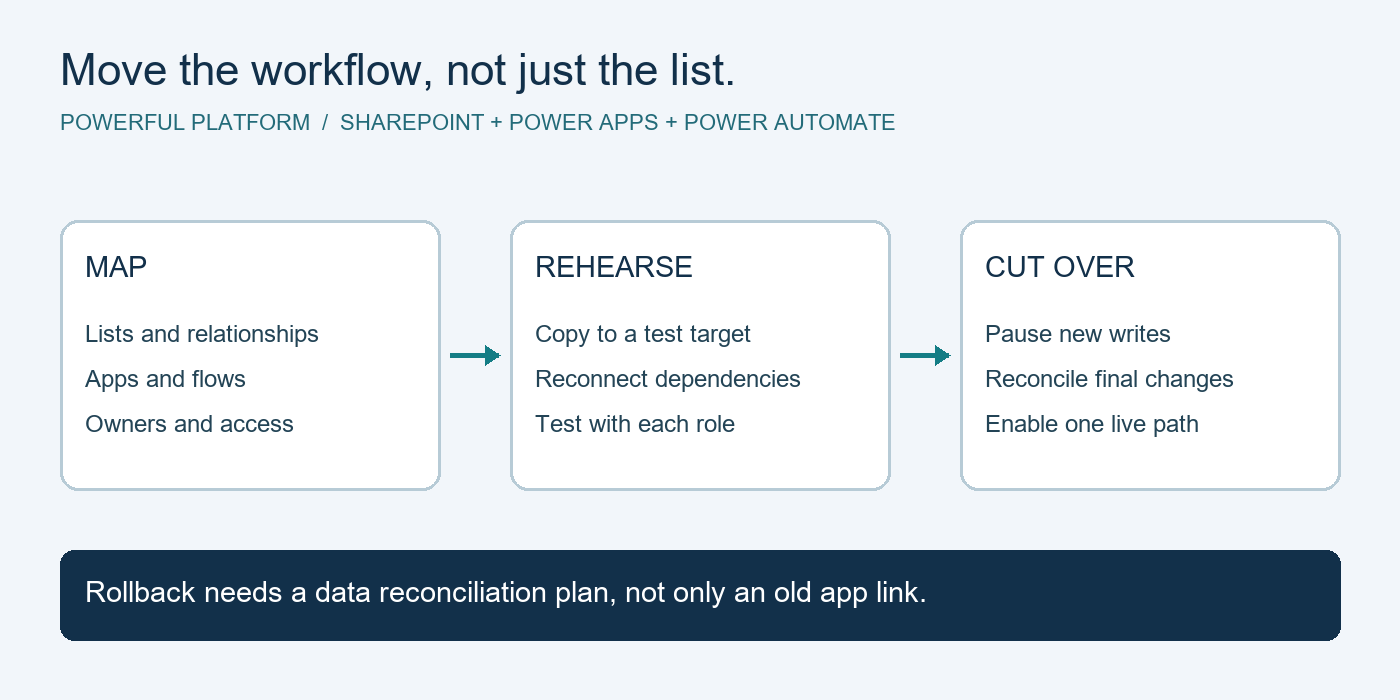
A structured migration reduces risk by addressing those realities early. The first step is usually assessment. That means reviewing your current infrastructure, data locations, user access, internet reliability, backup posture, and security gaps. From there, your IT partner can identify what should move, what should stay, what needs cleanup, and what may need to be replaced.
The next step is prioritization. Not everything should move at once. In many small businesses, email and collaboration tools are a logical starting point because they affect nearly everyone and often deliver immediate value. File storage may follow, along with identity management, endpoint policies, and selected applications. Legacy systems sometimes require a hybrid approach for a period of time.
Testing is another major risk control. Before a full cutover, a provider should validate permissions, data integrity, workflows, and access from different devices and locations. That step is easy to underestimate until someone cannot open a critical client file on a Monday morning.
Then there is change management. Even a technically successful migration can feel like a failure if employees are confused. Clear communication, training, and responsive support are part of the service, not an extra. People need to know what is changing, when it is changing, and where to get help.
The difference between migration and modernization
Moving systems to the cloud is useful. Moving and improving at the same time is usually better.
This is where many businesses miss an opportunity. They migrate old clutter into a new environment, then wonder why the results feel underwhelming. A better approach is to use the project to simplify the way work gets done.
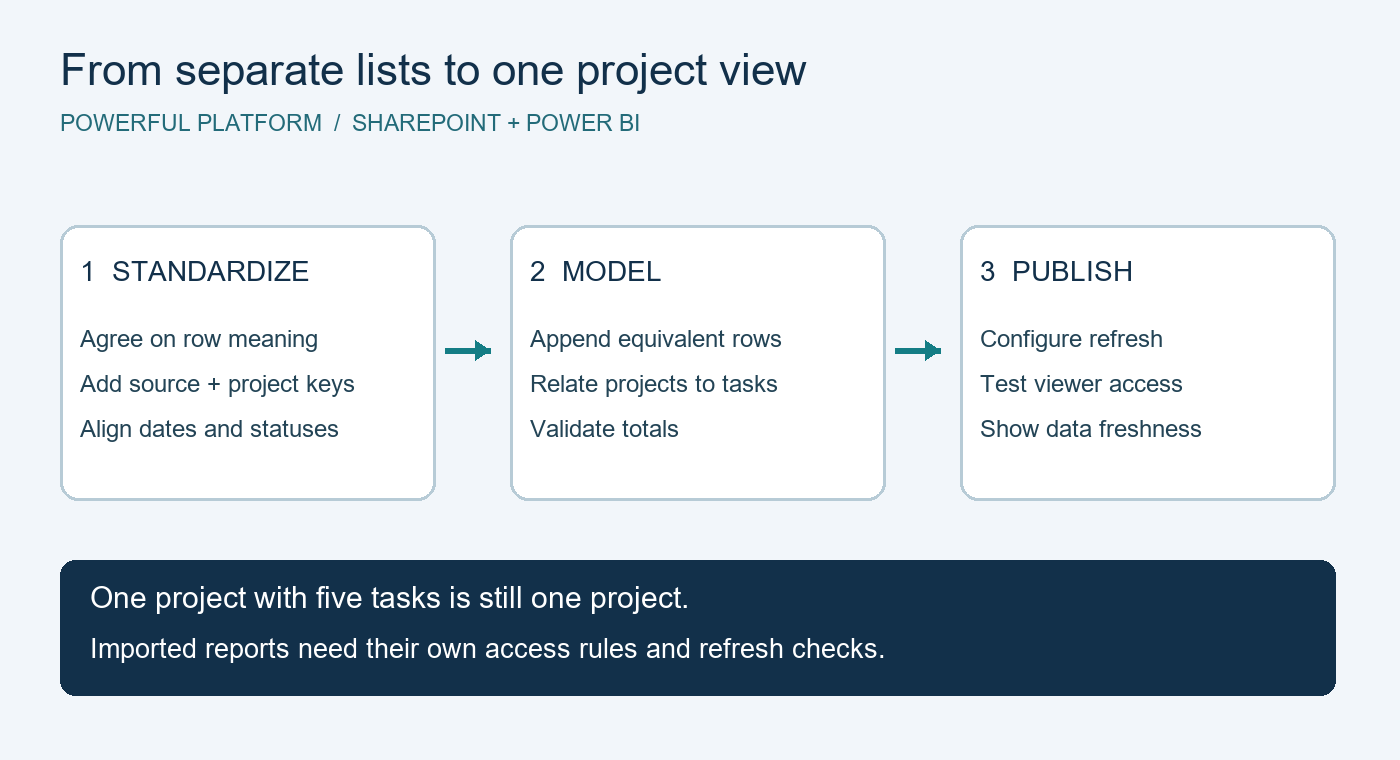
For example, a company moving to Microsoft 365 may also standardize file storage in SharePoint and OneDrive, replace scattered email attachments with shared collaboration spaces, strengthen multi-factor authentication, and automate repetitive approvals or form-based workflows. That turns migration into operational improvement.
Modernization does not mean changing everything at once. In fact, trying to redesign every process during migration can slow progress. The smarter move is to identify a few high-value improvements that align with immediate business goals. That could mean secure remote access, better document control, faster onboarding, or more reliable backup and recovery.
What to look for in a cloud migration partner
Not every IT provider is built for this kind of work. Some can complete the technical move but offer little support before or after. For a small business, that gap matters.
You want a partner that can connect migration decisions to real business outcomes. That means asking about workflow impact, security requirements, user experience, business continuity, and long-term support. It also means being honest about trade-offs. In some cases, a full migration makes sense. In others, a phased plan is safer and more cost-effective.
Look for a provider that combines cloud expertise with ongoing managed support. Once systems are in the cloud, someone still needs to monitor performance, manage licenses, enforce security policies, support users, maintain backups, and help the environment evolve as the business grows. Migration should be the beginning of a better IT operating model, not the end of the conversation.
It is also worth asking how they handle documentation, escalation, and post-migration cleanup. Those are often the details that separate a stressful project from a controlled one. A customer-first, accountable approach matters just as much as technical skill.
Common challenges and how the right service addresses them
One common challenge is poor data quality. Years of duplicate files, outdated folders, and inconsistent permissions can make migration harder than expected. A strong provider helps clean and organize before moving everything over.
Another issue is application compatibility. Some older software may not perform well in a cloud-first environment or may require a different hosting strategy. This is where experience matters. The goal is not to force every tool into the same model. The goal is to build an environment that supports the way your business actually operates.
Bandwidth and connectivity can also affect the timeline. If a business has limited internet capacity, migration may need to be staged during off-hours or weekends. That is not a reason to avoid the project. It is simply part of planning it properly.
Security is often the biggest concern, and rightly so. Moving to the cloud changes your risk profile. It can improve security significantly when paired with the right controls, but only if identity management, device policies, access permissions, and backup strategies are addressed from the start. Cloud migration without security planning is just risk in a different location.
When is the right time to start?
Usually before your current setup forces the issue.
If your team is dealing with recurring downtime, unsupported hardware, file access problems, weak remote work capabilities, or growing security concerns, waiting often costs more than planning. The same is true if your business is adding staff, opening locations, or trying to standardize processes across teams.
That does not mean you need a massive project tomorrow. It means it is worth having a practical assessment now. A clear roadmap can show what needs immediate attention, what can wait, and how to pace the investment. For many organizations, that visibility alone reduces stress.
The best small business cloud migration services do more than move technology. They give leadership confidence that systems will support the next stage of growth instead of holding it back. That is the real value – not just getting to the cloud, but getting there in a way that leaves your business more secure, more productive, and easier to run.
If your current environment feels harder to manage with every new hire, device, or application, that is usually your signal. The right migration plan should make technology feel less like a constant concern and more like a dependable part of how your business moves forward.

Leave a Reply