


A payroll deadline is not the time to find out that the accounting system is offline, a staff member cannot access email, or yesterday’s backup did not run. For a growing company, technology problems quickly become business problems. This small business IT support guide explains how to build dependable support around the outcomes that matter most: productive employees, protected data, minimal downtime, and a clear path for growth.
What Reliable IT Support Should Actually Deliver
Many small businesses begin with an informal IT arrangement. An employee who is comfortable with technology handles minor issues, a local technician is called when something breaks, and software decisions are made one subscription at a time. This may work for a very small team, but it becomes costly as more employees, devices, client records, and cloud tools enter the picture.
Effective IT support is not simply a helpdesk that resets passwords. It is a managed approach to keeping technology stable, secure, and aligned with how your company operates. That includes monitoring systems before failures disrupt work, standardizing devices and software, protecting information, helping employees quickly, and advising leadership on what should change next.
The right level of service depends on your organization. A 10-person agency with mostly cloud-based work has different needs than a tax firm handling sensitive financial records or a preschool managing family and student information. Both, however, need ownership. Someone should be accountable for the health of the environment, not just available when an emergency occurs.
Start With Business Risks, Not a Technology Shopping List
Before comparing IT providers or buying another software platform, identify where a technology failure would hurt the business. Consider the systems your team needs to serve clients, process payments, communicate, store files, and meet deadlines. Then ask what would happen if each system were unavailable for a day, or if the information within it were exposed.
This conversation often reveals gaps that are easy to overlook. For example, staff may save client files in several locations, former employees may still have access to accounts, or a key workflow may depend on one person’s spreadsheet. These are operational risks as much as technical ones.
A useful support plan also accounts for the employee experience. If staff lose time trying to connect to a printer, locate the right file version, or get help with a new laptop, the hidden productivity cost adds up. Support should make daily work easier, not create more procedures for employees to manage.
The Core Layers of Small Business IT Support
A dependable IT environment is built from several connected services. Leaving out one layer can undermine the rest.
Responsive helpdesk and device management
Employees need a clear place to go when something is not working. A responsive helpdesk resolves issues such as access problems, email errors, device setup, software questions, and connectivity concerns without forcing business leaders to become the middleman.
Behind the scenes, device management keeps computers updated, protected, and consistently configured. This becomes especially valuable during onboarding. A new hire should receive a properly prepared device, the right accounts, and access to the tools required for their role on day one. When an employee leaves, access should be removed promptly and completely.
Cybersecurity that fits the business
Small businesses are frequent targets because attackers know internal security resources are often limited. Basic protections such as multi-factor authentication, endpoint protection, email filtering, secure password practices, and regular updates make a meaningful difference.
Technology alone is not enough. Employees need practical guidance on suspicious emails, payment-change requests, unexpected login prompts, and the proper handling of sensitive files. The goal is not to make everyone a security specialist. It is to make safe actions routine and provide a fast escalation path when something looks wrong.
Security should be proportional to risk. A company that handles regulated data, financial information, or large volumes of customer records may need more formal controls and documentation. A knowledgeable IT partner can help prioritize improvements rather than treating every security product as equally urgent.
Backup and recovery planning
A backup is only useful if it can be restored when needed. Businesses should know what data is backed up, how often backups run, how long restoration may take, and who is responsible for coordinating recovery.
Cloud platforms offer strong reliability, but they do not eliminate the need for a recovery plan. Accidental deletion, compromised accounts, retention limits, and misconfigured sharing can still place critical information at risk. Backup strategies should cover the systems that keep the business operating, including files, email, key cloud data, and line-of-business applications where appropriate.
Recovery planning should also address disruption beyond data loss. If the office loses internet access, a device fails, or ransomware affects a user account, can employees work from another location? Can leadership communicate with clients? A short, tested plan provides far more confidence than a document no one has reviewed in years.
Cloud management and workflow improvement
Microsoft 365, Azure, and similar cloud platforms can support flexible work, better collaboration, and stronger controls. Yet many companies use only a fraction of what they already pay for. Files remain scattered, teams rely on manual email chains, and repetitive work consumes hours each week.
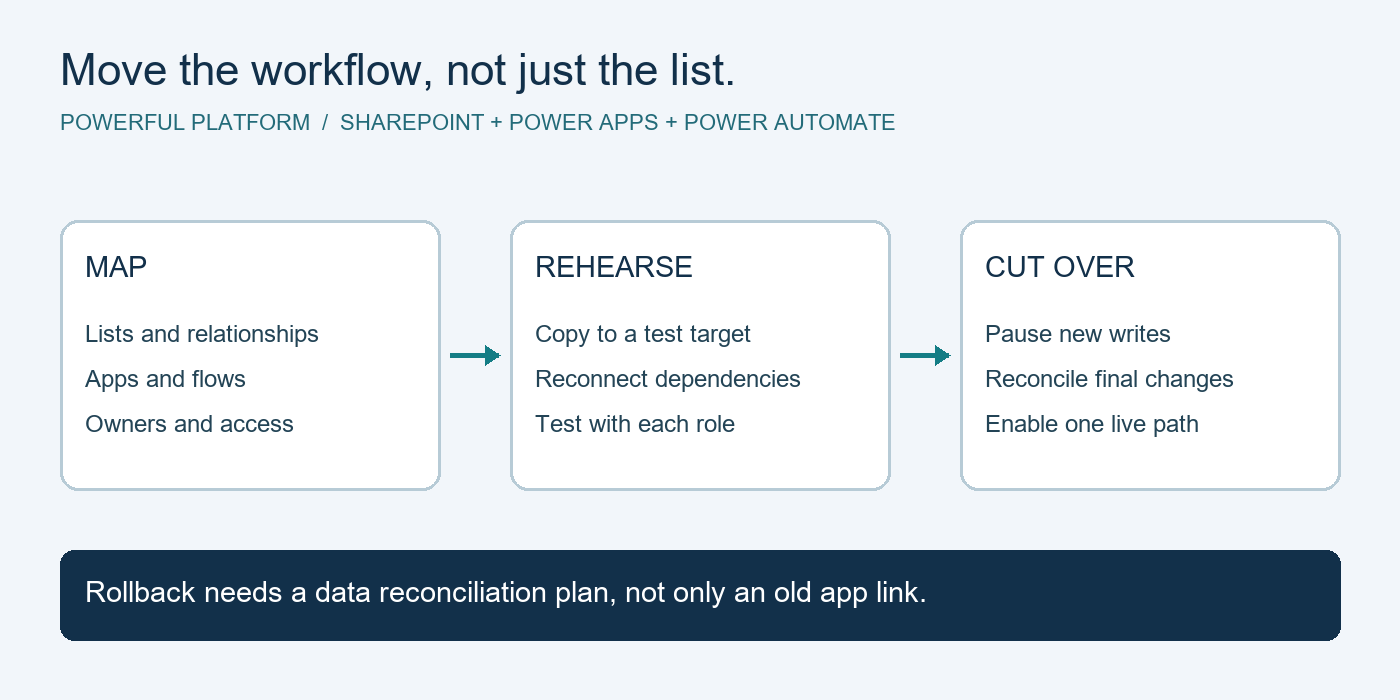
This is where IT support can become a growth tool. A provider that understands cloud optimization and process automation can help organize document storage, improve approvals, automate reminders, reduce duplicate data entry, and create clearer reporting. Automation should follow a stable process, however. Automating a confusing workflow only makes confusion happen faster.
Choose Proactive Support Over Break-Fix Service
Break-fix IT has a straightforward appeal: call for help, pay when there is a problem. For a business with very few devices and low dependence on technology, it can be a reasonable short-term choice. The trade-off is that the provider has little incentive or time built into the relationship to prevent issues, document systems, or plan ahead.
Managed IT support is designed for companies that depend on technology every day. It typically combines ongoing monitoring, maintenance, helpdesk service, security oversight, backup management, and strategic guidance under a predictable monthly arrangement. Instead of waiting for a server, laptop, or account to fail, the support team watches for warning signs and addresses routine maintenance before it interrupts employees.
Not every managed service agreement is the same. Ask what is included, what is billed separately, how urgent issues are handled, and whether the provider supports your full environment or only certain devices. Clear service expectations are more valuable than vague promises of unlimited support.
Questions to Ask an IT Support Provider
A strong provider should be able to explain its approach in business language. You should understand who will support your staff, how requests are prioritized, and how the provider communicates when there is a serious issue.
Ask how they monitor systems, manage software updates, protect endpoints, and verify backups. Ask whether they document your environment and whether that documentation remains available to your company. It is also reasonable to ask about onboarding, offboarding, security training, vendor coordination, and the process for recommending technology investments.
Most importantly, ask how often they meet with leadership to discuss technology priorities. Your needs will change as you add staff, open locations, adopt new applications, or take on clients with higher security expectations. A provider should bring recommendations with context, cost considerations, and a realistic sequence, not simply sell the newest tool.
Powerful Platform approaches this relationship as an outsourced technology department, combining day-to-day support with cloud expertise and practical automation opportunities. That model helps business leaders spend less time coordinating vendors and more time running the company.
Build a 90-Day IT Improvement Plan
You do not need to solve every technology issue at once. Begin by documenting the essentials: users, devices, core applications, access levels, internet service, data locations, and current backup arrangements. This creates a baseline for prioritization.
During the first 30 days, focus on immediate risks. Remove unnecessary access, enable multi-factor authentication, confirm backups, address unsupported devices, and establish a dependable support channel. In the next 30 days, standardize onboarding and offboarding, review file-sharing practices, improve update management, and identify repeated helpdesk issues.
By day 90, leadership should have a practical technology roadmap. It should identify the next investments, estimated timing, expected business value, and responsibilities. That may include replacing aging devices, consolidating software, improving Wi-Fi, migrating files, or automating a repetitive approval process.
Make Technology a Source of Confidence
The best IT support is often quiet. Employees can work, clients receive timely service, information is protected, and leadership knows there is a plan when conditions change. That peace of mind does not come from buying more technology. It comes from consistent ownership, preventive care, and support that understands where the business is going next.

Leave a Reply