

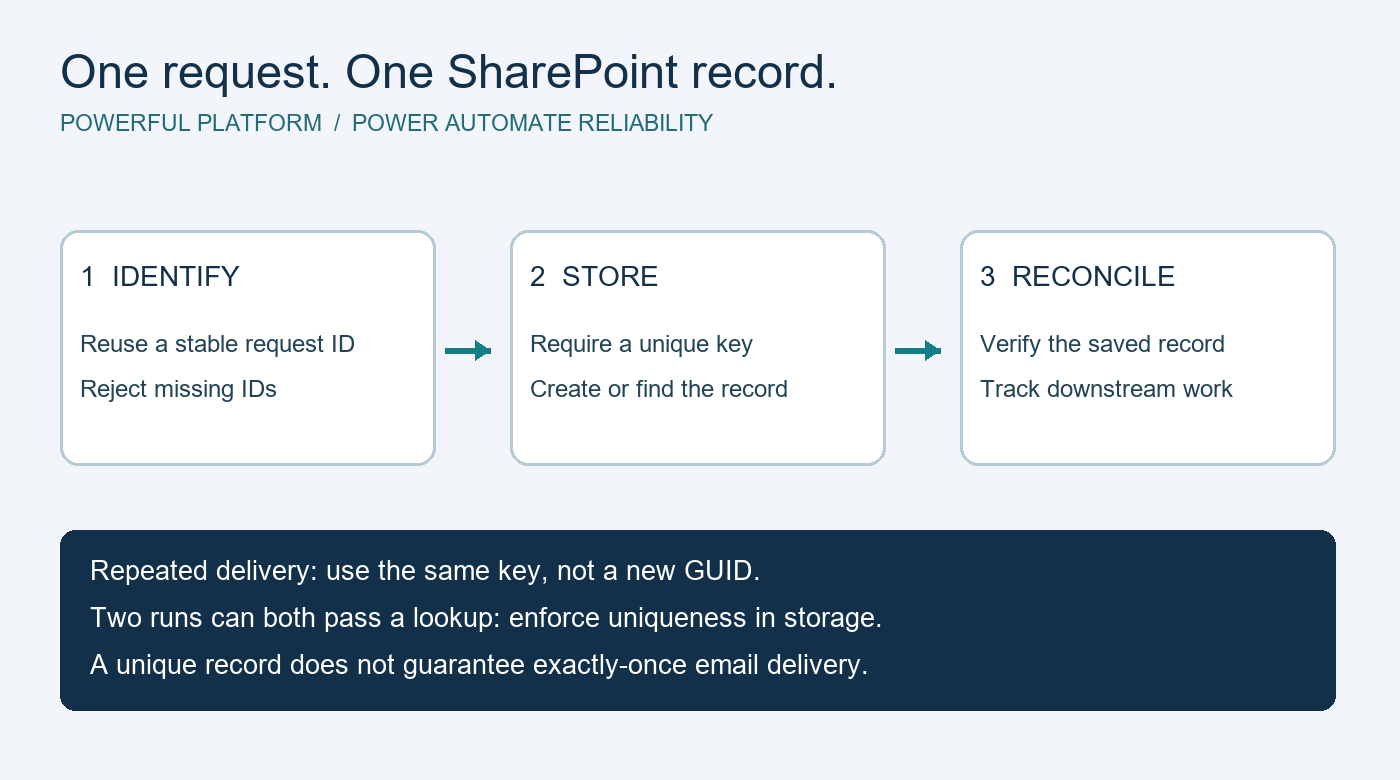
A request arrives once, but two SharePoint items appear. The cause might be a repeated submission, overlapping flow runs, or an action retried after an uncertain response. Removing the extra item fixes the symptom; a repeat-safe intake design addresses the cause.
This guide describes a high-level Power Automate pattern for keeping one SharePoint record per logical request. It is a design proposal, not a deployed flow or a tenant-tested export.
Prerequisites and intended outcome
You need a SharePoint list you can configure, a cloud flow with permission to write to it, and a source that provides a stable request identifier. Confirm your organization’s connector and licensing entitlements before implementation. Existing Microsoft subscriptions may cover some scenarios, but this pattern does not make the platform license-free.
The target is simple: replaying request DEMO-104 should find the same item instead of creating another. A different request must still create a different item, even if its title or contact details happen to match.
1. Establish what makes a request unique
Prefer an identifier assigned by the source when the request is first created. Preserve that identifier through retries. If multiple sources feed the list, include a source namespace, such as demoform:DEMO-104. Do not generate a new GUID on every flow run: that makes every replay look new.
Do not use a person’s email address as the request key; the same person can submit several legitimate requests. Define how the key handles letter case and whitespace, keep it within the destination column’s limits, and reject missing identifiers for review. A correction to an existing request needs an explicit update policy rather than silently creating another item.
2. Enforce uniqueness where the data is stored
Add a required single-line text column such as RequestKey and enable unique values. Review existing data for duplicates before enabling the constraint. SharePoint unique columns reject duplicate values; uniqueness is case-insensitive. Microsoft’s list relationship and unique-column guidance describes these rules and supported column types.
A lookup before Create item can be useful, but it is not sufficient protection. Two simultaneous runs can both find no matching item and both attempt creation. A storage constraint supplies the final check regardless of which run arrives first.
3. Treat existing records as a defined outcome
Look up the exact request key. When an item already exists, record its item ID and follow your replay or update policy. When no item exists, attempt creation with the same key. If creation fails, inspect the failure and query by key again before deciding what happened.
Only classify the outcome as an already-stored request when the matching record is found and verified. Permission errors, invalid fields and throttling are not duplicate confirmations. If the same key arrives with materially different content, route it for review instead of overwriting the original without a policy.
4. Plan for uncertain responses and partial completion
A timeout can leave you unsure whether the write succeeded. Reconcile against the stable key before attempting another write. Use scopes and Run after paths to separate normal processing from recovery, and record a useful outcome such as Created, Existing, Needs review or Failed. Microsoft’s error-handling guidance explains scopes, retries and failure paths.
Track downstream tasks separately. One SharePoint item does not guarantee one email: a message can be sent successfully before saving its “sent” marker fails. For uncertain delivery, provide a reconciliation path rather than claiming exactly-once notifications. Never treat the mere existence of an intake item as proof that every later action completed.
5. Reduce unnecessary runs without relying on that alone
Use trigger conditions where appropriate and avoid having flow updates repeatedly trigger the same work. Concurrency settings can limit overlapping runs within a flow, but do not protect against another flow or another writer. Review workload and queue behavior before changing them. Microsoft’s trigger optimization guidance covers these controls.
6. Test the failure cases deliberately
In a test list, send a synthetic request twice, then send two copies concurrently. Verify that exactly one intake item remains. Test missing keys, changed content under the same key, denied access, and a failure after item creation. Check both run history and stored records; a green run alone does not establish correctness.
Keep logs limited to the request key, item ID, outcome and diagnostic details needed by authorized maintainers. Do not copy full personal submissions or signed endpoints into general-purpose logs.
Limits and community help
This pattern prevents duplicate intake records only when every writer supplies the same stable key and the constraint remains enforced. It does not provide a transaction across SharePoint, email and other systems. No flow was imported or executed for this article, and no download is presented as a working implementation.
For a focused design question, use the template on Powerful Platform’s free community help page. Describe the repeated event and expected outcome with synthetic examples. Do not include private data or credentials. Response availability is not guaranteed.
Research note: a public search result for a Power Automate and SharePoint troubleshooting opportunity highlighted duplicate-prevention needs. Retrieved October 18, 2026; an absolute posting date was not verified, and direct retrieval failed. Current availability is unverified. This original guide generalizes the problem without reproducing the project specification.


Leave a Reply