


A missed client follow-up, an invoice stuck in someone’s inbox, or a new employee waiting days for access may seem like small operational problems. Repeated across a growing business, they become expensive friction. This workflow automation planning guide helps small and midsized businesses identify the right processes to improve, avoid costly shortcuts, and build automations employees can rely on.
Automation is not about replacing every human decision with software. It is about removing repetitive handoffs, reducing preventable errors, and giving your team more time for client service, planning, and revenue-producing work. The strongest programs begin with business priorities, not a list of available app features.
Start With the Business Problem, Not the Tool
Many companies begin by asking whether they should use Microsoft Power Automate, a customer relationship management platform, or another automation tool. Those choices matter later. At the planning stage, the more useful question is: where is manual work creating risk, delay, or frustration?
Look for processes that happen frequently, follow a predictable pattern, and rely on information moving between people or systems. A tax and accounting firm may spend too much time chasing missing client documents. An agency may lose visibility once a proposal is approved and a project moves into delivery. A preschool administrator may re-enter enrollment details in several systems while trying to keep families informed.
These are good candidates because the process has a clear trigger and a measurable outcome. By contrast, a workflow that requires judgment, negotiation, or frequent exceptions may need process improvement before it needs automation. Automating a confusing process simply helps confusion move faster.
Map the Current Workflow Before Designing the Future One
A practical automation plan starts with a short, honest workflow map. Document what causes the process to begin, who owns each step, what information is required, which systems are involved, and how the work is considered complete. Include the workarounds people use when a form is incomplete, an approval is delayed, or a system does not respond.
This step often reveals the real issue. What appears to be a reminder problem may actually be unclear ownership. What appears to be a data-entry problem may be caused by two departments using different definitions for the same customer status.
Keep the map simple enough that the people doing the work can review it. Ask them where they wait, retype information, search for answers, or worry that something has been missed. Their input is essential because they understand the exceptions that a manager may not see.
Define the trigger, action, and exception path
Every reliable workflow needs three things. First, define the trigger: a submitted form, a signed agreement, a new email attachment, or a changed record status. Next, define the action: create a task, request approval, update a record, notify a team, or store a document in the correct location.
Then define what happens when conditions are not met. If a new client onboarding form is missing a required field, should the workflow notify the client, assign a follow-up task, or stop until an administrator reviews it? Exception paths are where many automations fail when they are planned too quickly.
Prioritize Workflows by Value and Readiness
Not every frustrating process should be automated first. A useful planning exercise is to score each opportunity based on business impact, frequency, process stability, risk reduction, and implementation effort.
High-value early projects often include employee onboarding, service ticket routing, approval requests, recurring compliance reminders, document collection, and client follow-ups. These workflows tend to be repeatable and visible enough for the business to recognize the improvement quickly.
A process with a major payoff but unclear rules may still be worth pursuing, but treat it as a process redesign project first. It may require standard forms, cleaner data, or agreement on ownership before automation is appropriate. This is not a delay for its own sake. It protects the business from building a solution that requires constant manual repair.
Build Security and Governance Into the Plan
For small businesses, automation can create a new risk if data moves without clear controls. A workflow may handle employee records, financial information, client documents, or contact details. The planning process should identify what data is involved and who should be able to access it at every step.
Use role-based permissions, multi-factor authentication, and approved business systems rather than personal accounts or disconnected consumer apps. For organizations using Microsoft 365, Microsoft Power Platform can provide a practical foundation because it can work with existing identity controls, SharePoint document management, Teams notifications, and business data.
Governance does not need to be heavy-handed. It does need to be clear. Decide who owns the workflow, who can change it, how changes are tested, and who receives an alert if it fails. Without that ownership, a helpful automation can become another undocumented system that no one feels responsible for maintaining.
Plan for continuity, not just convenience
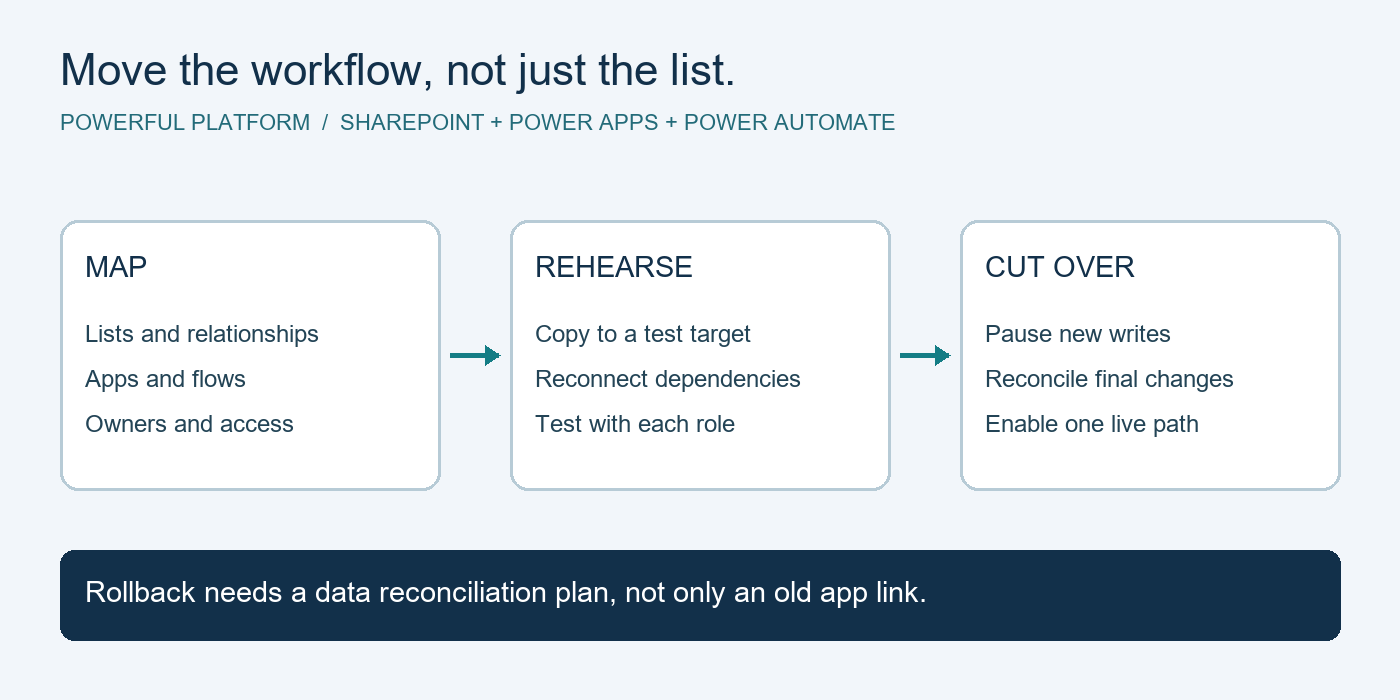
An automation that sends a notification is useful. An automation that is monitored, backed by documented procedures, and recoverable when something changes is dependable. Consider what happens if an employee leaves, a shared mailbox is renamed, an application connection expires, or a vendor changes its interface.
Document service accounts, dependencies, approval owners, and recovery steps. For critical workflows, create a manual fallback process so operations can continue during an outage. This is particularly important for client-facing deadlines, payroll-related tasks, and processes tied to regulated information.
Test With Real Scenarios and a Small Pilot
Before deploying widely, test the workflow with normal cases and difficult ones. Use incomplete submissions, duplicate records, unusual naming conventions, delayed approvals, and denied requests. Verify that notifications go to the right people and that records are stored where the team expects to find them.
A small pilot gives employees time to provide practical feedback without disrupting the entire business. It also reveals whether the automation saves time in practice, not just on a diagram. Sometimes an extra approval step should be removed. Other times, a human review is necessary to protect quality.
Training should explain more than which button to click. Employees need to know what the workflow does, what they are still responsible for, and how to report an issue. Clear communication reduces the concern that automation is being imposed on the team without regard for their daily work.
Measure Results and Improve Deliberately
Set a baseline before launch. Depending on the workflow, that may include processing time, number of follow-ups, error rates, missed deadlines, ticket volume, or time spent on data entry. After implementation, review the same measures at regular intervals.
The goal is not to create the highest possible number of automations. It is to create measurable operational improvement. If a workflow saves five minutes but introduces regular exceptions, it may need refinement. If it reduces onboarding delays from three days to one day, the impact may extend well beyond the administrative team.
As your business grows, revisit automations that were built around old roles, volumes, or systems. A good workflow automation planning guide is a living operating practice, not a one-time technology project. The process should evolve as your teams, clients, and service expectations change.
For businesses that want guidance across both daily IT operations and process improvement, Powerful Platform can help connect automation decisions to security, cloud management, and long-term technology planning. The best next step is often a focused conversation about one process your team handles every day and the time it could return to the business if it worked more reliably.

Leave a Reply