

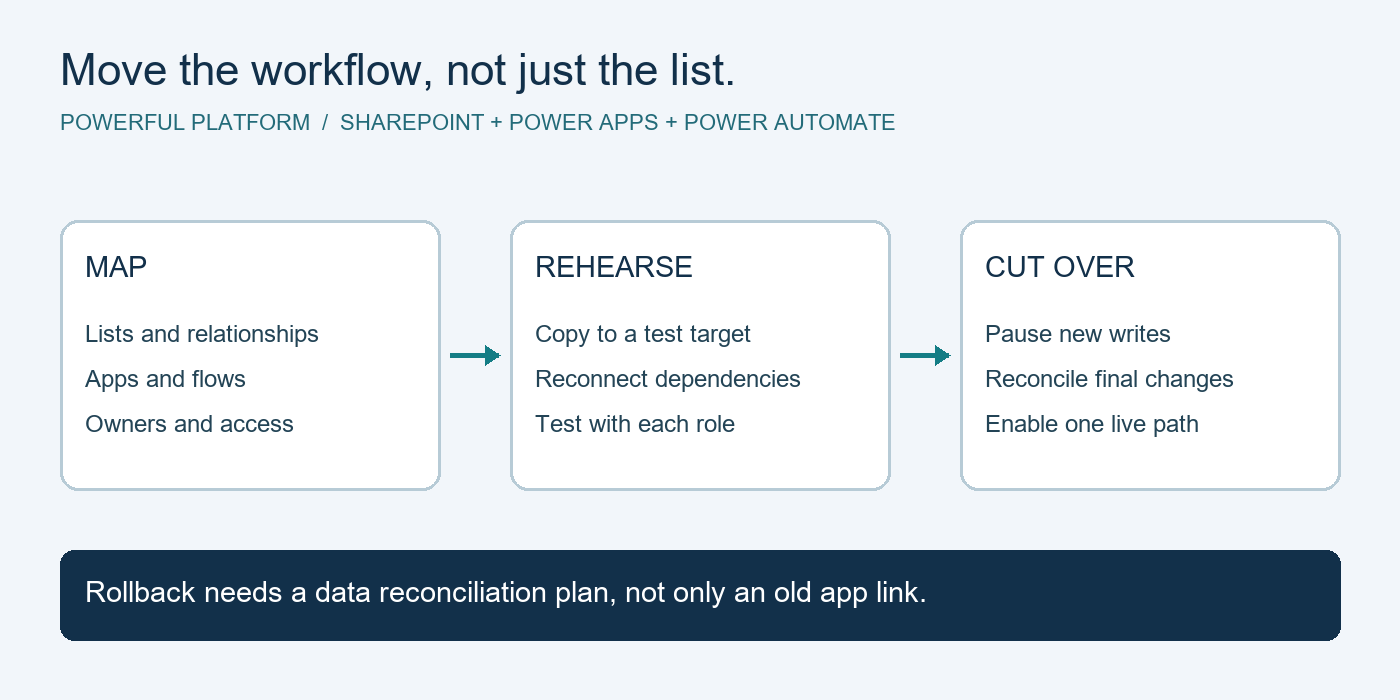
Moving a SharePoint list can leave a working business app pointing at the old site. Files may arrive while lookup relationships, flow triggers and form behaviour still depend on the source. A reliable migration treats the list, app and automation as one business process.
This high-level guide describes a move between SharePoint Online sites, with a test rehearsal before production cutover. The intended outcome is a functioning destination with reconciled records and a documented recovery path. It is a planning pattern, not an executed migration or an importable solution.
Prerequisites and scope
Identify a business owner, an authorized maker and a SharePoint administrator. Agree which data may be copied, the permitted test location, the maintenance window and acceptance criteria. Use synthetic records for initial checks. Confirm licenses for the users, connectors and environments involved; existing Microsoft subscriptions do not automatically cover every app or migration tool. Solution-based deployment also requires a suitable environment and permissions.
1. Map the process before copying anything
Inventory lists, libraries, columns, attachments, lookup relationships, permissions, views, apps and flows. Include hard-coded links in emails, navigation and reports. Record each component’s owner, source dependency, proposed destination and validation check.
Separate standalone canvas apps from Power Apps forms customized inside a SharePoint list. They have different deployment considerations. Also identify running approvals and scheduled jobs: a pending process cannot be assumed to move just because its underlying record was copied.
2. Rehearse the data move and preserve relationships
Create a controlled target and compare column types, internal names, required fields and lookup targets. Choose a migration method after checking its support for attachments, versions, metadata and permissions. A matching row count alone does not demonstrate a successful move.
Do not assume numeric item IDs remain unchanged. Where IDs change, retain a source-to-target mapping and use it to repair child lookups and links. For a synthetic example, request DEMO-014 and its three evidence files should still belong together after migration. Compare representative records, files and access rules, including records with empty or unusual values.
3. Reconnect the app using the right pattern
For an eligible solution-based canvas app, data source environment variables can separate SharePoint site and list configuration from the app. Add the dependencies to the solution and set destination values deliberately. This configuration does not copy SharePoint data or grant access. Follow Microsoft’s data source environment variable guidance.
For a customized SharePoint form, plan and test the destination form explicitly. Microsoft’s SharePoint form integration documentation explains the list-bound integration control and notes that automatic copying between environments is not provided. Test New, View, Edit, Save and Cancel from the destination list, not only inside Studio.
4. Reconnect flows and contain test side effects
Review every trigger and action for source-site references. For solution-aware flows, bind connection references to authorized destination connections; the connection authenticates access while site and list parameters select the resource. See Microsoft’s connection reference documentation. Do not assume adding an existing flow to a solution automatically replaces its direct connections.
Keep test notifications confined to approved test recipients. Prevent copied historical items from causing live reminders or approvals. Decide how to finish, cancel or restart in-flight work with the business owner, preserving an audit trail. Verify the destination flow’s owner and connection permissions before enabling it.
5. Test as real roles, including failure paths
Use a test matrix covering create, update, attachments, lookups, rejection, retry and unauthorized access. Run it as a normal submitter and reviewer, not only as an administrator. Confirm both successful writes and the absence of unintended writes to the source.
Trace one synthetic request from form submission through its flow and resulting notification. Confirm that links open the destination record. Test expired connections or denied access in a controlled environment and make failures visible to an accountable owner. Document observed results rather than marking checks passed because configuration looks correct.
6. Cut over once and reconcile before retiring the source
Agree a short write pause, capture final changes and reconcile them into the destination. Disable the old automation before enabling the replacement so that both paths do not send notifications or update records. Switch entry links, complete a smoke test and monitor failures during an agreed observation period.
Define rollback triggers and decision ownership before the switch. If users have written new data at the destination, returning them to the old app requires reconciling those changes first. Retain the source according to organizational retention rules until the business owner accepts the migration.
Limitations and validation
No tenant migration, app import or flow execution was performed for this guide. Tool capabilities and preservation of history must be validated for the chosen method. Cross-tenant moves, identity changes and regulated records need additional planning. There is no downloadable flow attached to this article because a generic export would not encode your migration dependencies safely.
Bring your migration question to the community
Visit Powerful Platform Community Help and use the contact form with the prefix Community Help. Describe the app type, source and destination, and the failing step using synthetic examples. Do not include credentials, signed endpoints or private business records. Support availability is not guaranteed.
Research note: a public Upwork migration listing informed the general problem, retrieved October 21, 2026. Search results displayed September 28, 2026 as its posting date; direct retrieval failed, so that date and current availability are not independently verified. This original guide is not a client case study.

Leave a Reply