


When a 15-person firm loses access to email, files, or its line-of-business software for a day, the impact is not merely technical. Client work stops, employees improvise, deadlines move, and leadership is pulled away from growth. A technology roadmap for small business turns those recurring risks and frustrations into a practical plan for better decisions, steadier operations, and controlled investment.
The goal is not to buy every new tool or replicate an enterprise IT department. It is to make sure technology supports the next stage of your business: protecting critical data, helping people work effectively, reducing manual work, and giving leaders a clear view of what to address next. For most small and medium-sized businesses, that means setting priorities in the right order rather than trying to solve everything at once.
What a technology roadmap should accomplish
A useful roadmap connects business goals to technology decisions over the next 12 to 36 months. It identifies what you have, where the risks are, what needs attention first, who owns each action, and how success will be measured.
That distinction matters. An inventory might tell you that the company has 24 laptops, five software subscriptions, and a file server. A roadmap explains whether those assets are reliable enough for your growth plans, whether access is secure, whether subscriptions overlap, and whether your team can continue serving clients during an outage.
For a growing accounting practice, the priority may be secure remote access, dependable document storage, and stronger protection during tax season. For an agency, the immediate need could be consistent project collaboration and faster onboarding for new staff. A preschool may focus first on safeguarding student and family information while ensuring staff can access the systems they need without sharing passwords. The right plan depends on the business, but the underlying questions are consistent.
Start with business outcomes, not a tool list
Technology planning works best when it begins with operational reality. Ask what the business needs to accomplish in the next one, two, and three years. Are you adding employees? Opening another location? Supporting more remote or hybrid work? Taking on clients with stricter security requirements? Reducing the time your staff spends re-entering information between systems?
Those answers create decision criteria. If growth depends on hiring quickly, standardized devices, user accounts, and onboarding processes deserve attention. If client trust is central to your reputation, backup, recovery, identity protection, and security awareness training should move higher on the list. If your staff is spending hours each week chasing approvals or copying data into spreadsheets, workflow automation may deliver a meaningful return.
This approach also prevents a common mistake: replacing a system simply because it is old. Some older systems are stable and still fit the business. Others create hidden costs through downtime, security gaps, poor supportability, or manual workarounds. The question is not whether a tool is new. It is whether it reliably supports the work you need to do.
Assess the environment before setting priorities
A roadmap needs a clear starting point. That begins with a practical assessment of the technology environment, including devices, network equipment, software, cloud services, user accounts, data storage, security controls, backups, and vendor relationships.
The assessment should look beyond the obvious. Many businesses have systems that work well enough on a normal day but fail under pressure. Perhaps backups run but have never been tested for restoration. Maybe former employees still have access to shared accounts. A critical application may depend on one aging computer, one vendor contact, or one employee who knows how it works. These are business continuity concerns, not minor IT details.
It is also worth mapping where employees lose time. Repeated password issues, inconsistent file locations, unreliable Wi-Fi, slow computers, duplicate data entry, and unclear support processes all add friction. Individually, each problem can seem small. Across an entire team and year, they can become a material drag on productivity.
Build the technology roadmap for small business in phases
Once the current state is clear, organize the plan into phases. Most organizations benefit from a sequence that stabilizes the foundation, strengthens protection, improves productivity, and then expands automation or strategic capabilities.
First, reduce operational risk
Start with the issues most likely to interrupt business or expose sensitive information. This often includes managed endpoint protection, multi-factor authentication, security patching, monitored backups, tested recovery procedures, and clear access controls. Reliable helpdesk support also belongs in this phase because small issues become expensive when employees cannot get timely help.
A recovery plan deserves particular attention. Backups are necessary, but a backup is only useful if your business can restore the right information within an acceptable timeframe. Define which systems are critical, how quickly they need to return, and who will communicate with staff and customers if an incident occurs. The answer may vary between a shared document library and a system used to process payroll or serve clients.
Next, standardize the work environment
After addressing immediate risks, reduce the variation that makes technology difficult to manage. Standard device configurations, documented software choices, centralized identity management, and consistent file-sharing practices make support faster and onboarding easier.
For many businesses, Microsoft 365 provides a strong foundation for email, document collaboration, identity management, and secure file access. However, adoption matters as much as licensing. If employees continue storing files in personal folders, use informal messaging for sensitive decisions, or create separate accounts for every tool, the business will not receive the full benefit. Your roadmap should include training, governance, and a clear process for adopting new tools.
Then, target high-value productivity improvements
Once the basics are dependable, look for repetitive processes that can be simplified. Automation should address a specific business bottleneck, not exist as a technology experiment. Good candidates include approval workflows, new employee onboarding, client intake, notifications, document routing, and recurring reporting.
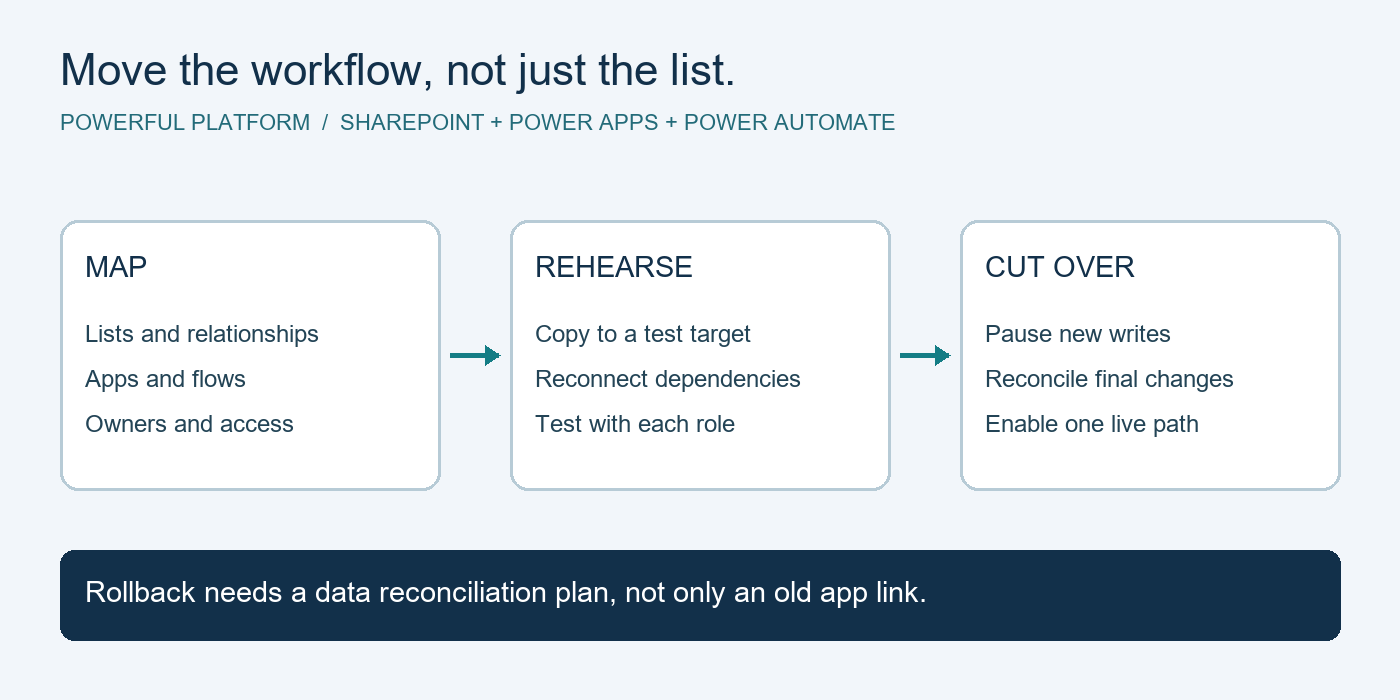
Microsoft Power Platform can be useful here, particularly for organizations already working in the Microsoft ecosystem. The trade-off is that automation needs ownership and documentation. A workflow created quickly by one employee can become a support problem if nobody understands how it operates or what happens when a process changes. Build automations with clear owners, sensible permissions, and a process for review.
Set timelines, budgets, and ownership
A roadmap without dates or owners becomes a wish list. Each initiative should have a target timeframe, a responsible person or partner, an estimated cost, and a measurable business reason. For example, replacing unsupported devices may be scheduled over two budget cycles, while multi-factor authentication should be completed within a defined short-term window.
Separate initiatives into immediate, near-term, and longer-term work. Immediate items address active risks or painful disruptions. Near-term projects often include standardization, cloud migration, or improvements to collaboration. Longer-term investments can focus on deeper process automation, reporting, and tools that support planned expansion.
Budgeting should include more than purchase prices. Consider implementation time, employee training, ongoing licenses, support, maintenance, and the cost of change. The least expensive option can become costly if it is difficult to support or does not integrate with the rest of your environment. At the same time, not every business needs the most advanced option. The appropriate investment is the one that lowers risk and creates useful capacity for your actual plans.
Review the roadmap as the business changes
Technology roadmaps should be reviewed at least quarterly and updated when major business conditions change. A new client contract, acquisition, office move, compliance request, or growth surge can alter your priorities quickly.
Regular review also creates accountability. You can track practical measures such as downtime, support ticket trends, backup test results, employee onboarding time, phishing training completion, and hours saved through automation. These indicators help leaders see whether technology spending is improving operations rather than simply adding more tools.
For businesses without internal IT leadership, an experienced managed IT partner can provide the structure needed to maintain this process. Powerful Platform helps organizations connect day-to-day support, security, cloud management, backup protection, and automation to a longer-term plan, so decisions are not made only when something breaks.
A good roadmap gives your business permission to move deliberately. Address the risks that could stop work, create a dependable foundation for your people, and invest in improvements that remove real friction. That is how technology becomes a source of confidence and capacity instead of another item competing for your attention.

Leave a Reply