

A team can have carefully restricted records in a Power App and still expose too much information in a reporting model. Treat an imported report as a separate access boundary: decide who may read the extracted data before sharing the report.
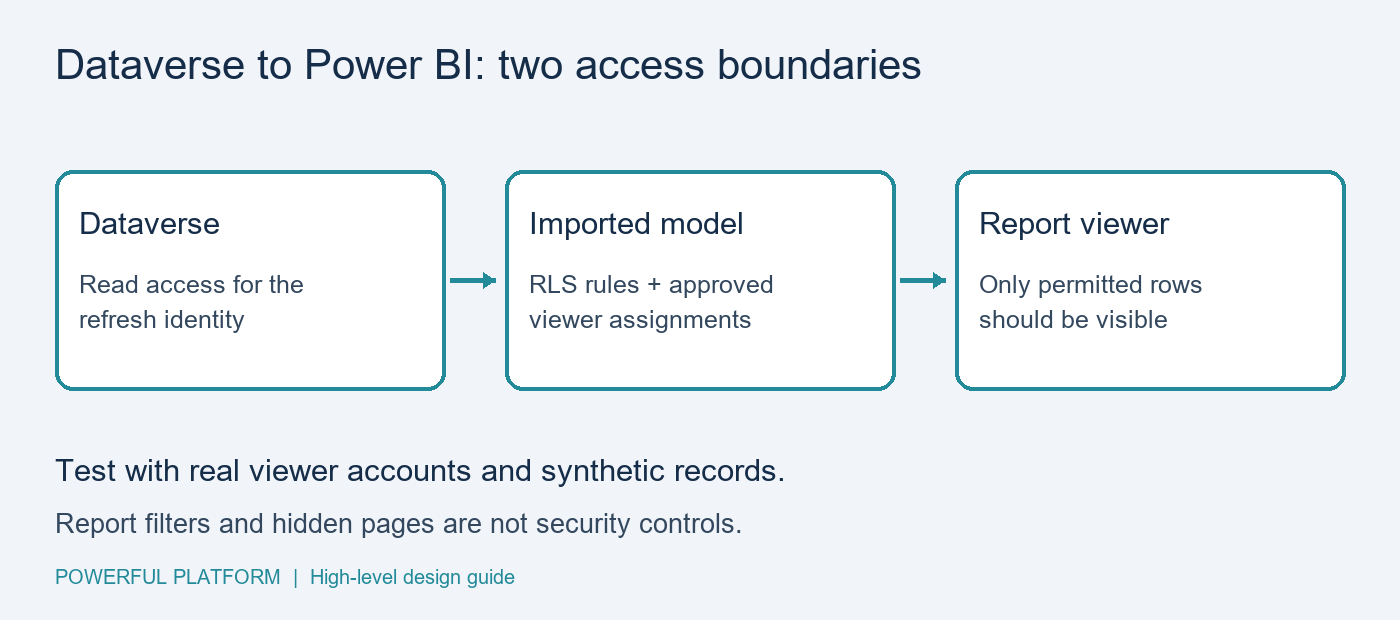
The problem and intended outcome
Imagine a service-request app where each coordinator handles one region. The reporting connection reads multiple regions for management. Each coordinator should see only their assigned region in the report, while approved management viewers receive the intended broader view. These are illustrative requirements, not results from a deployed client project.
Prerequisites
Use a development Dataverse environment, Power BI Desktop, a controlled publishing workspace and synthetic records. Document the reporting identity, permitted tables and columns, audience and regional access matrix. The Dataverse connector requires table read permissions and an enabled TDS endpoint. Confirm organizational approval and network prerequisites before connecting. Microsoft documents Import and DirectQuery in the Dataverse connector reference.
High-level implementation steps
- Write the access matrix first. Define which regions each viewer may access, who approves changes and what an unmapped viewer should see. Default an unknown identity to no business rows. Include someone with two authorized regions in the test plan.
- Keep the imported dataset small. Bring in only necessary columns and records. Record whose credentials refresh the model. Do not assume a Dataverse app role automatically becomes a viewer-specific rule in an imported copy.
- Model the authorization relationship. Maintain a controlled mapping from signed-in viewer identity to allowed regions. Review the relationship path that filters the request table. Report slicers, hidden pages and navigation buttons are not access controls.
- Define and assign RLS. Create model roles, publish and assign approved viewers or groups. Microsoft states that RLS applies to workspace Viewers, while Admins, Members and Contributors are not restricted by it. Follow the official RLS configuration guide.
- Test negative cases. Check permitted and forbidden records with synthetic data and actual consumer accounts as well as role simulation. A North-only viewer must not retrieve a South request through details, drill-through or an enabled export. Test unmapped identities and overlapping roles; multiple roles can broaden access.
- Operate deliberately. Assign owners for access changes and refresh failures. Update access promptly when someone changes region or leaves, then verify the result. An imported authorization table also depends on refresh. Retest after relationship, role or sharing changes.
A small acceptance checklist
Create fictional requests N-001 and S-001. A North viewer should see N-001 only; a South viewer S-001 only; an authorized cross-region viewer both; an unmapped viewer neither. Verify counts and detail access, not just the default chart. Record expected and observed results before releasing real data.
Limitations and licensing
This guide targets Import models. DirectQuery identity delegation, embedding and external guests need separate design and testing. Row restrictions do not themselves hide sensitive columns; exclude unnecessary fields or evaluate column security. Downloaded exports cannot be recalled by a later model permission change. Power BI sharing and capacity requirements, Dataverse entitlements and organizational policies still apply; this is not a license-free solution. No PBIX, tenant configuration or executed security test is supplied.
Ask the community
Bring an anonymized access matrix to Powerful Platform Community Help. Use the contact form with the prefix Community Help. Describe storage mode, audience and the access result you need. Do not send credentials, customer records or production exports.
Design guidance reviewed October 28, 2026. Inspired by a public marketplace reporting requirement; no client endorsement or implementation result is implied.

Leave a Reply