


A spreadsheet that only one employee understands, a shared inbox full of requests, and repeated copy-and-paste between systems are more than minor annoyances. They are signs that a business process has outgrown the tools supporting it. Custom business app development gives growing companies a practical way to turn those fragile, manual workflows into reliable systems that are easier to manage, secure, and scale.
For small and medium-sized businesses, the goal is rarely to build an app for its own sake. The goal is to reduce delays, prevent costly errors, give employees clear next steps, and make information available when decisions need to be made. The right application can accomplish all of that without forcing your team to adopt a large, expensive platform that does not fit how you work.
What Custom Business App Development Actually Solves
A custom business application is software designed around a specific process, team, or operational challenge. It might be an internal request portal, a client onboarding system, a project approval app, a field-service checklist, or a dashboard that brings together data from several business systems.
The key difference is fit. Off-the-shelf software is built to serve a broad market, so businesses often adjust their processes around the product’s limitations. A custom app starts with the process that already creates value for your organization, then improves the parts that cause friction.
Consider a tax and accounting firm collecting documents from clients. Emailing reminders, tracking missing files in spreadsheets, and manually updating staff can work at low volume. As the client base grows, however, the process can lead to missed deadlines, duplicate follow-ups, and uncertainty about who owns the next task. A purpose-built app can create a structured intake process, notify the right team member, track status, and retain a clear record of activity.
The same principle applies to agencies managing creative approvals, preschools handling enrollment documentation, and professional service firms coordinating new client work. The best use cases are usually not flashy. They are the recurring processes that consume time, create avoidable risk, or depend too heavily on individual memory.
When a Custom App Is the Right Investment
Not every inefficient process requires a custom application. Sometimes a better configuration of Microsoft 365, clearer procedures, or employee training will solve the problem. A custom solution becomes more compelling when a process is repeated frequently, involves several people, relies on multiple systems, or has a meaningful cost when something goes wrong.
Volume matters. Saving five minutes on a task that occurs once a month may not justify a development effort. Saving five minutes on every customer request, employee onboarding step, or approval cycle can create a meaningful return over time.
Risk matters as well. If a process involves sensitive client data, financial records, employee information, or compliance requirements, a controlled application can reduce the reliance on unsecured email attachments and informal tracking methods. Security still requires thoughtful design, access controls, monitoring, and user training, but a well-managed app gives the business a stronger foundation than scattered files and ad hoc workarounds.
Integration is another deciding factor. Many businesses already use capable tools, but employees must move data manually between them. An app can provide one clear interface while connecting approved systems in the background. That reduces duplicate entry and helps teams work from more consistent information.
Start With the Workflow, Not the Features
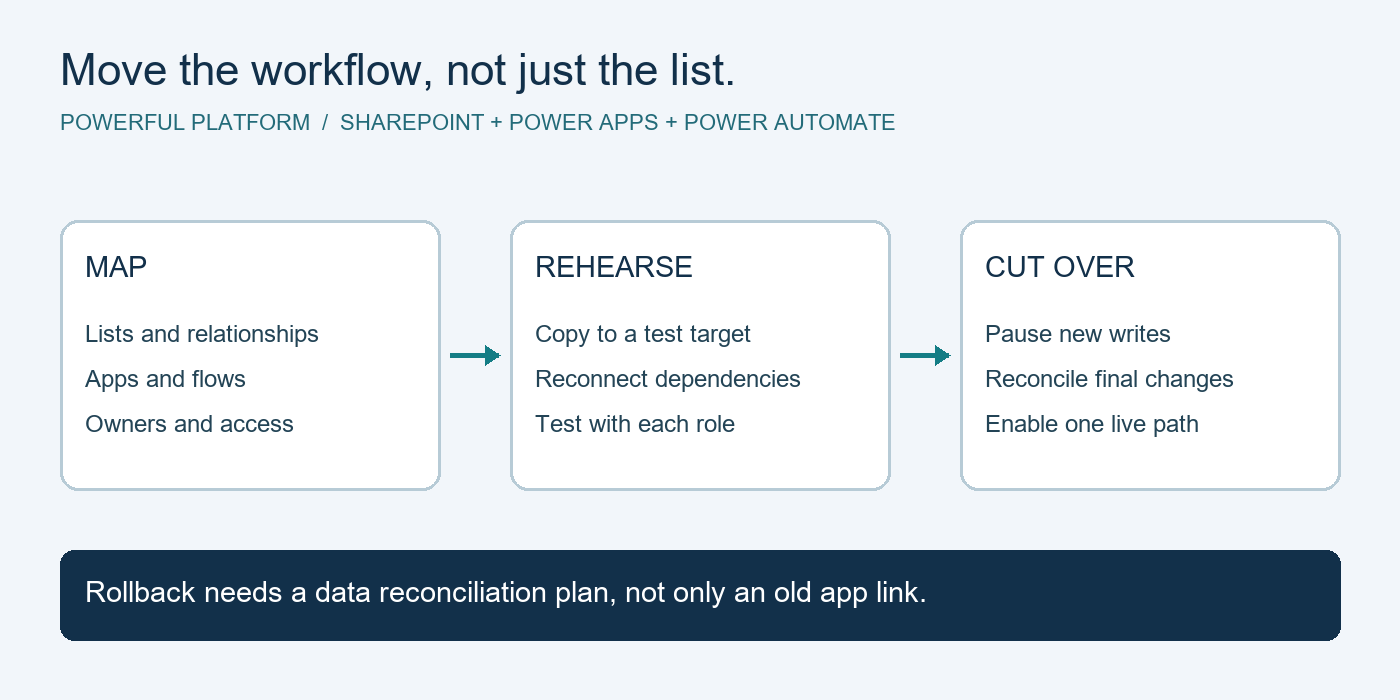
The most successful projects begin with a close look at the current workflow. Before discussing screens, forms, or automation, identify what triggers the process, who is involved, where information enters the business, and what a successful outcome looks like.
This discovery work often reveals that the visible problem is only one part of the issue. For example, a manager may request a dashboard because reports take too long to prepare. The real challenge may be inconsistent data entry, unclear ownership, or disconnected sources of information. Building a dashboard without addressing those causes simply produces a faster view of unreliable data.
A practical planning conversation should answer several questions in plain business language. What tasks are employees repeating? Which handoffs create delays? What information is difficult to find? Where do errors occur? Which approvals need an audit trail? And how will the business measure whether the new process is working?
The first version should focus on the highest-value workflow rather than every possible feature. This keeps the project manageable and gets a useful tool into employees’ hands sooner. Additional capabilities can follow once the team has real-world feedback.
Define ownership before development begins
An application needs a business owner, not just a technical contact. That person should be able to make decisions about process rules, priorities, and acceptable trade-offs. Without clear ownership, teams can end up with a long list of conflicting requests and no shared definition of success.
Employees who perform the work every day should also be involved early. They understand the exceptions, shortcuts, and customer expectations that may not appear in a process document. Their input helps create an app that supports real work rather than an idealized version of it.
Choosing the Right Technology Approach
Custom does not always mean building every component from scratch. For many small and medium-sized organizations, low-code platforms such as Microsoft Power Apps and Power Automate can provide a faster, more cost-effective path for internal applications and workflow automation. When paired with Microsoft 365, SharePoint, Teams, Azure, and approved data sources, these tools can support useful business solutions while staying within a familiar technology environment.
Low-code development is especially effective for forms, approvals, service requests, internal tracking, mobile data collection, notifications, and role-based workflows. It can shorten development time and make future changes easier when the business process evolves.
There are limits. A highly specialized customer-facing product, advanced performance requirements, complex integrations, or unique compliance obligations may call for traditional custom software development or a hybrid approach. The right decision depends on the intended users, expected growth, data sensitivity, integration needs, and long-term maintenance plan.
A trusted IT partner should explain these trade-offs clearly. The most expensive option is not automatically the best one, and the fastest option is not always sustainable. The objective is a solution that fits the business need without creating unnecessary complexity or a support burden your team cannot maintain.
Security and Support Are Part of the Application
An app that saves time but exposes business data is not a successful app. Security should be considered from the first planning session, including who can access the app, what data each role can see, how information is stored, and how activity is monitored.
For businesses using Microsoft tools, identity and access management can be a major advantage. Multi-factor authentication, role-based permissions, device policies, conditional access, and data loss prevention measures can help protect information while allowing employees to work productively. The exact controls should match the sensitivity of the data and the realities of how your staff works.
Support also matters after launch. Business processes change. New employees need access. A connected system may update. A department may need a revised approval step or report. Without documented ownership and ongoing management, even a well-designed app can gradually become another unsupported tool.
That is why custom app work should sit within a broader technology plan. Powerful Platform approaches automation and application development as part of dependable IT management, with attention to security, cloud services, user support, and the ongoing health of the systems your team relies on.
Measure Results in Business Terms
A successful application should produce results that leadership can recognize. Depending on the use case, that may mean fewer hours spent on manual entry, faster response times, fewer missed deadlines, better visibility into work in progress, or reduced errors in client records.
Establish a baseline before implementation whenever possible. If onboarding currently takes ten business days, document why. If staff spends several hours each week compiling updates, estimate the effort. These measures make it easier to prioritize improvements and demonstrate the value of the investment after launch.
It is also useful to watch for less obvious gains. A better workflow can reduce employee frustration, make training easier, and prevent knowledge from being trapped with one person. Those benefits are difficult to put on a spreadsheet, but they directly affect continuity and growth.
The strongest custom applications do not try to transform every part of the business overnight. They make one important process more dependable, then create a foundation for the next improvement. Start with the work that slows your team down most often, and build from there with a clear plan for security, ownership, and support.

Leave a Reply