


A client agreement arrives by email, an employee saves it to a shared folder, someone forwards it for approval, and then the thread goes quiet. Three days later, a manager asks who has the document and whether it was signed. This is the kind of everyday friction that can consume more time than most businesses realize. When you automate document workflows, routine handoffs become tracked, timely processes instead of a chain of manual follow-ups.
For small and medium-sized businesses, the goal is not to automate every file overnight. It is to remove the repetitive work that slows down billing, onboarding, compliance, client service, and internal approvals. Done well, automation gives your team more consistency without making work feel impersonal or complicated.
Where document workflows usually break down
Most document problems are not caused by the document itself. They happen in the handoffs around it. A proposal is ready but sits in an inbox waiting for review. A new hire completes a form, but payroll never receives it. A customer submits paperwork, yet the information must be typed into several systems before anyone can act.
These gaps create real business risk. Staff spend time searching for the current version, managers approve requests too late, and sensitive files may be shared through personal email or stored in locations with unclear permissions. For accounting firms, agencies, preschools, and other service-focused organizations, delays can affect client confidence as quickly as they affect internal productivity.
A workflow should answer a few simple questions: What starts the process? Who owns the next step? Where does the document belong? What happens if no one responds? If your team cannot answer those questions consistently, the process is a strong candidate for automation.
Choose the right workflows to automate first
Start with a process that is frequent, predictable, and frustrating. High-volume paperwork with clear rules usually delivers the fastest return. Client intake packages, invoices requiring approval, employee onboarding forms, purchase requests, service agreements, and recurring compliance documents are common examples.
Avoid beginning with a highly unusual process that changes every time. Automation works best when there is an agreed-upon path, even if that path has a few sensible exceptions. Before selecting a tool, map the current process from start to finish. Include the people involved, the systems they use, approval thresholds, required data, and common delays.
This exercise often reveals that the issue is not simply a lack of automation. It may be duplicate data entry, unclear ownership, or too many versions of the same template. Fixing those issues first keeps you from automating a confusing process faster.
A practical first-use case
Consider a purchase approval workflow. An employee submits a request through a standardized form. The request is automatically routed to the right manager based on department or cost. If the amount exceeds a set threshold, it moves to a second approver. Once approved, the request is stored in the proper location, the requester receives a notification, and the finance team can see the decision without chasing email threads.
The people involved still make the decisions. Automation handles the routing, reminders, recordkeeping, and status updates that should not require manual effort.
Build the workflow around people, not just software
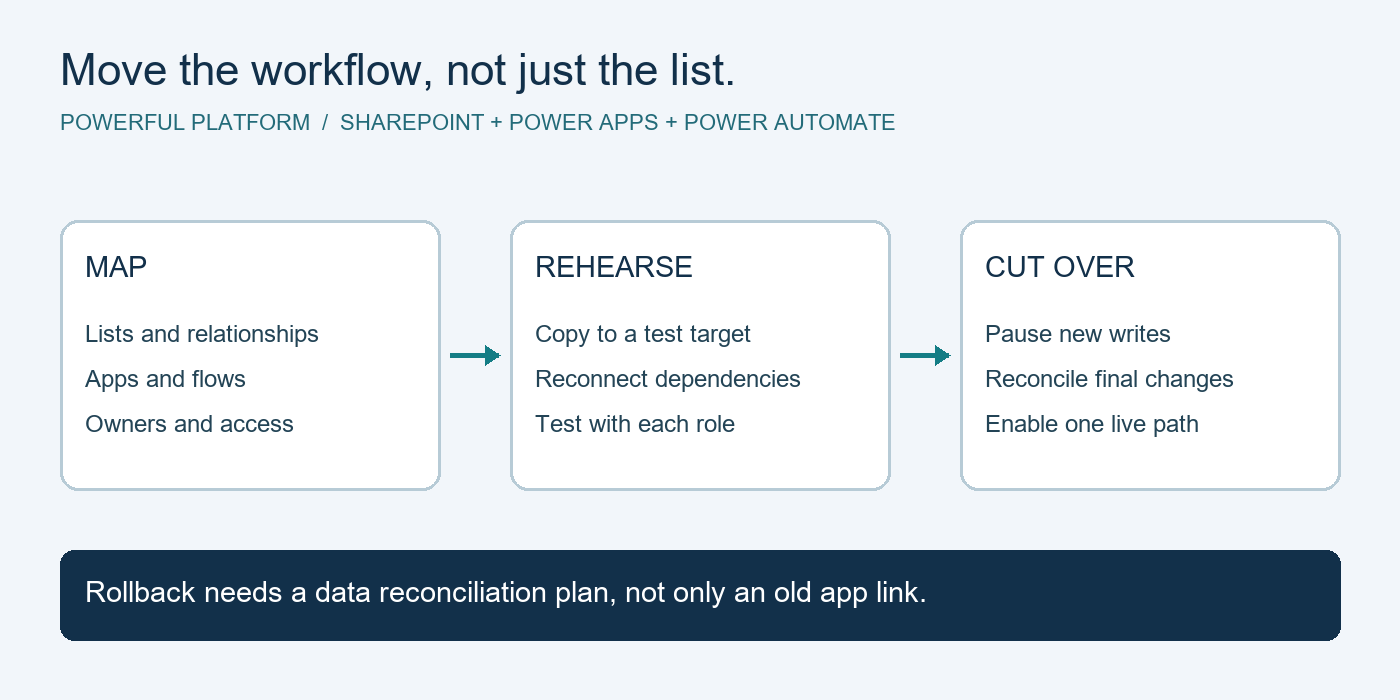
Microsoft 365 and Power Platform tools can provide a practical foundation for document automation, particularly for businesses already using Outlook, Teams, SharePoint, and Microsoft Forms. A form can collect consistent information. SharePoint can provide a controlled document location and version history. Power Automate can route files, send approval requests, create tasks, and notify the right people in Teams or email.
But software configuration is only one part of the work. The process needs clear business rules. Decide who can submit requests, who can approve them, what information is mandatory, and what should happen when an approver is unavailable. Set expectations for response times and escalation as well.
For example, an approval reminder after 24 hours may be helpful for a time-sensitive invoice. Escalating every routine request after an hour may simply create noise. The right settings depend on the urgency of the process and the way your team actually works.
Use secure document automation from the start
Documents often contain financial details, client records, employee information, or contracts. Convenience should not come at the expense of security. A well-designed workflow limits access based on each person’s role, stores files in approved business systems, and creates an audit trail that shows when key actions occurred.
Keep sensitive documents out of uncontrolled personal inboxes and local desktop folders whenever possible. Use permissions to ensure staff can access only the files they need. Enable multifactor authentication, establish retention rules where appropriate, and make sure departing employees lose access promptly.
You should also consider where automated data goes after a form is submitted. If a workflow copies information into a spreadsheet, customer relationship management system, or accounting platform, verify that the destination is authorized and protected. Connecting systems can save substantial time, but every connection should have a business purpose and an owner responsible for reviewing it.
Test exceptions before launching
A workflow that works only under perfect conditions will frustrate employees quickly. Test the situations that happen in real business operations: an incorrect attachment, a missing field, a rejected request, an unavailable approver, a duplicate submission, or a document that needs revision after review.
Give a small group of users a chance to test the process before rolling it out company-wide. Their feedback can identify unclear instructions, notifications that arrive too often, and steps that still require manual work. It is easier to adjust a pilot than to rebuild trust after a poorly planned launch.
Document ownership matters here. Assign someone to monitor the workflow, review failures, and approve changes. That person does not need to be a developer, but they should understand the business process and know when to involve IT support.
Measure whether the workflow is helping
Automation should produce visible operational improvements, not just a more sophisticated process diagram. Establish a baseline before implementation. How long does the process take today? How many incomplete forms are submitted? How often do staff ask for status updates? How much time is spent re-entering data or searching for documents?
After launch, compare those numbers over time. You may find that approvals move faster but that one department has a higher rejection rate because the form needs better guidance. That is useful information. The best workflows improve through regular review rather than being treated as a one-time project.
Look for benefits beyond labor savings. Faster response times can improve the client experience. Standardized intake can reduce errors. Clear document history can make audits and internal reviews less stressful. These outcomes help a growing business operate with greater confidence.
When to involve an IT partner
A basic workflow may be manageable internally, especially if it is limited to one department and uses familiar Microsoft 365 tools. More complex requirements often benefit from experienced planning. This includes workflows that involve confidential data, multiple systems, detailed approval logic, external users, compliance requirements, or a large number of documents.
An IT partner can help assess the process, configure the right Microsoft environment, set permission standards, and support the workflow after it goes live. That ongoing support is valuable because business processes change. A workflow built for a five-person team may need different controls when the company reaches 25 employees or adds new locations.
Powerful Platform approaches automation as part of a broader technology strategy. The workflow should fit the way your staff work, align with your security policies, and remain dependable as your business grows.
The most useful place to begin is often one process your team complains about every week. Make that process easier to complete, easier to track, and easier to secure. Once employees see a document move from request to resolution without the usual chasing and confusion, they will have a clear reason to support the next improvement.

Leave a Reply