


A missed approval, a spreadsheet with three competing versions, and an invoice waiting in someone’s inbox may seem like small issues. Repeated across a business, they create delays, errors, frustrated employees, and less time for client work. Workflow modernization addresses those everyday breakdowns by replacing disconnected manual steps with clear, secure, and manageable processes.
For small and medium-sized businesses, this does not mean replacing every system or pursuing technology for its own sake. It means identifying where work gets stuck, choosing practical improvements, and building processes that support growth without creating more complexity for your team.
What Workflow Modernization Actually Means
Workflow modernization is the process of improving how information, approvals, tasks, and decisions move through your organization. It often combines better process design with cloud tools, automation, security controls, and ongoing IT management.
A modern workflow might route a new client intake form to the right team, create the needed records, notify the appropriate staff, and track the request to completion. A manual workflow might rely on emails, printed forms, repeated data entry, and someone remembering the next step. The difference is not simply speed. It is accountability, visibility, and consistency.
The goal is not to automate every human decision. Many professional service firms rely on judgment, relationship-building, and careful review. Those activities should remain human-led. The strongest candidates for improvement are repetitive, rules-based tasks that consume time without requiring deep expertise.
For example, a tax and accounting firm may standardize document requests and client reminders. An agency may automate project intake and approval notifications. A preschool may streamline enrollment forms, staff communications, and incident documentation. The right approach depends on the business, its compliance obligations, and the systems employees already use.
Why Manual Processes Become a Growth Problem
Manual workarounds can be useful when a company is small or a process is new. Over time, however, they become embedded in daily operations. A process that once involved two people can become dependent on several inboxes, local files, text messages, and institutional knowledge held by one employee.
That creates risk in several ways. Employees spend hours chasing status updates and copying information between systems. Managers cannot easily see where a request stands or why it has stalled. Important files may be stored outside approved locations, making access control and backup more difficult. When a key employee is away, the process slows down because nobody knows all the steps.
These problems are especially costly when the business is growing. Adding people to a broken process can increase volume, but it does not create clarity. Workflow modernization gives leaders a chance to simplify the process before inefficiency becomes the accepted way of working.
The cost is more than lost time
Time savings are often the first benefit leaders notice, but the larger value is operational reliability. A standardized approval path reduces missed handoffs. Centralized documents make it easier to find the current version. Automated reminders help teams meet deadlines without relying on memory.
Modernized workflows can also strengthen security. When staff use approved Microsoft 365 tools and role-based access instead of personal accounts and untracked file sharing, the business has better control over sensitive information. This matters for client records, financial data, employee files, and any information subject to retention or privacy requirements.
Start With Friction, Not Software
A common mistake is beginning with a tool selection meeting. Businesses hear about automation platforms, AI features, or a new application and try to find a use for them. That can produce an expensive process that employees avoid.
Start with the work itself. Ask where delays occur, what employees enter more than once, which requests regularly get lost, and which processes depend on one person’s memory. Look for high-volume activities with predictable rules, frequent follow-up, or a clear business impact.
A useful first project is usually focused and measurable. Consider a client onboarding workflow that currently requires several emails and manual checklists. Define the desired outcome: required documents collected, tasks assigned, approvals recorded, and the client informed of next steps. Then identify which parts need people and which parts can be standardized or automated.
This approach avoids automating a poor process. If a form asks for unnecessary information or an approval has no real purpose, automation will only make that inefficiency happen faster. Process improvement should come before configuration.
Build on Tools Your Team Already Uses
For many growing organizations, Microsoft 365 provides a practical foundation for workflow improvement. Teams can use Microsoft Forms for structured intake, SharePoint for controlled document storage, Teams for collaboration, and Power Automate for notifications, approvals, and repeatable actions. Microsoft Power Platform can extend those capabilities with tailored apps and reporting when a spreadsheet is no longer enough.
Using an existing platform can reduce training demands and limit tool sprawl. Employees are more likely to adopt a workflow when it appears in the tools they already open every day. It can also give IT teams a more consistent way to manage access, security settings, retention, and support.
That said, native tools are not always the right answer. A business may need an industry-specific application for tax workflows, education administration, or specialized client management. In those cases, modernization may mean integrating systems and clarifying ownership rather than forcing every task into one platform. The best solution is the one that reduces friction without compromising the requirements of the work.
Design for Adoption and Accountability
A workflow only delivers value when people use it correctly. That requires more than a technical launch. Employees need to understand what has changed, why it matters, and where to get help when something does not work as expected.
Keep the experience simple. Use clear names, short forms, logical approval paths, and notifications that tell people exactly what action is required. Avoid creating alerts for every small event. Too many notifications train staff to ignore them, which defeats the purpose of automation.
Ownership also matters. Every workflow should have a business owner who understands the process and can decide when a change is needed. IT should manage the technical environment, access, security, integrations, and support, but the department using the workflow should remain accountable for the business rules.
Documenting the process is part of the work, not an afterthought. A short description of the purpose, owners, inputs, exceptions, and recovery steps can prevent confusion later. It is particularly helpful when employees change roles or when the business needs to review a process after an audit, client issue, or service disruption.
Protect the Business While You Automate
Automation introduces new considerations. A workflow that sends client information to the wrong recipient, applies an incorrect approval rule, or continues running after an employee leaves can create real operational and security problems. Good governance keeps convenience from becoming a new risk.
Use least-privilege access so employees and automated accounts only have the permissions they need. Establish a process for reviewing workflow owners, connections, and shared mailboxes when staff join, change roles, or leave. Maintain backups and recovery plans for the systems and data that support critical workflows.
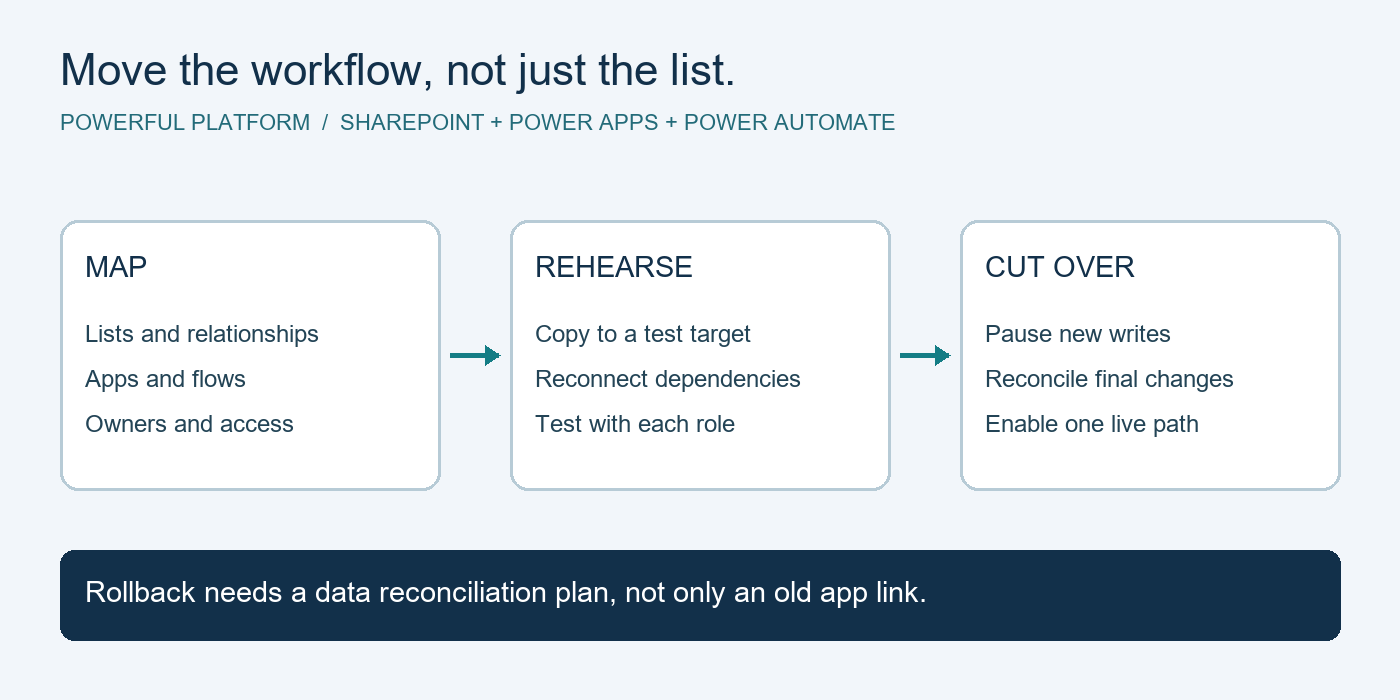
Testing is equally important. Before a workflow goes live, test normal scenarios as well as exceptions: incomplete forms, duplicate requests, unavailable approvers, incorrect data, and unexpected system changes. A controlled pilot with a small group often reveals issues before they affect the entire organization.
Ongoing monitoring matters because business processes change. New services, new compliance expectations, and new team structures can make an old workflow less effective. A trusted IT partner can help review performance, resolve issues, and keep the underlying cloud environment secure and dependable.
Measure Results That Matter to the Business
The right metrics depend on the process, but they should connect to an operational outcome. A client onboarding workflow may be measured by time to completion, missing-document rates, and client follow-up volume. An invoice approval workflow may focus on approval time, late-payment risk, and the number of manual exceptions.
Do not measure success only by how many automations exist. Ten poorly maintained workflows can create more confusion than one well-designed process. Look for reduced rework, faster response times, fewer missed handoffs, clearer reporting, and a better employee experience.
It is also wise to set realistic expectations. Some workflows produce immediate gains, while others require several rounds of refinement. The goal is steady improvement that employees can trust, not a one-time technology project that becomes difficult to support.
The most valuable next step is often simple: choose one recurring process that causes visible friction and map it with the people who perform it. When the improvement is practical, secure, and supported over time, it gives your team back something every growing business needs – more capacity to serve clients and move forward with confidence.
Turn your next manual process into a working improvement
Explore our business process automation service to see how we scope, build and support Microsoft-powered workflows. Bring one repetitive task to your free 30-minute IT & Automation Assessment and leave with practical next steps.

Leave a Reply